
Standing Desk Error Codes: How to Troubleshoot & Reset
- Oct 2, 2022
- 5 min read
Updated: Feb 20
How to Troubleshoot Your Adjustable Standing Desk: A Guide to Common Desk Frame Error Codes
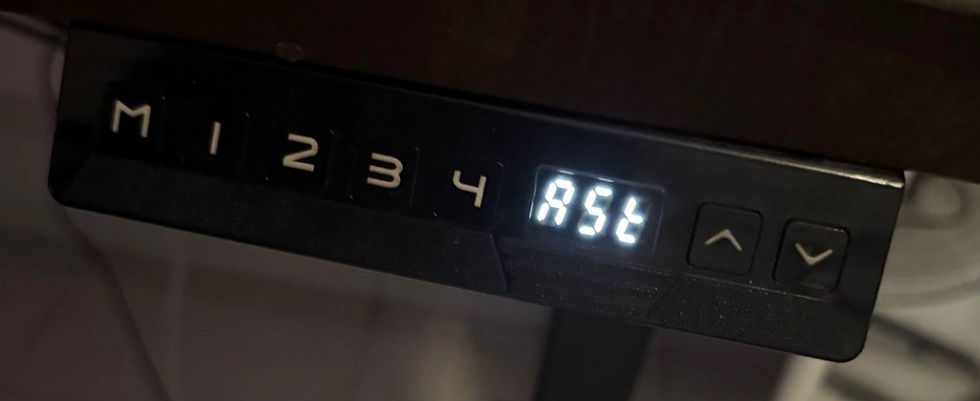
Encountering error codes on the control panel of your desk can be frustrating, especially when you're trying to optimize your workspace for productivity and comfort. However, understanding these common error codes and how to resolve them can quickly alleviate that frustration and ensure the smooth operation of your desk.
In this blog, we'll explore some of the most frequent desk frame error codes—including a few standard ones that might not be in your manual—and provide step-by-step solutions to help you troubleshoot and resolve them effectively.
⚡ Power & Temperature Errors
These errors typically mean the desk needs a quick break or a power cycle.
E09 / Hot: The main power has reached its high-temperature protection limit.
How to fix: Give your desk a rest. Wait about 15–20 minutes for the internal temperature to cool down before adjusting the height again.
E1, E6, E7: Main power issues (voltage too high, start error, or run protection).
How to fix: Check your main power source and reconnect the controller power cable. If you repeatedly see E6, the control box itself may need to be replaced.
⚙️ Motor & Connectivity Errors (E10s & E20s)
Note: Error codes in the teens (E11-E18) refer to Motor 1, while codes in the twenties (E21-E28) refer to Motor 2.
E11 / E21 (No Connect): The system cannot detect the motor.
How to fix: Unplug the desk and firmly check the cable connections between the motor and the control box.
E18 / E28 (Overload): The motor is trying to lift more than its capacity.
How to fix: Reduce the load on your desktop and try adjusting the height again.
E16 / E26 (Blocked) or E2 (Screw Clearance): The desk has detected a physical blockage or a clearance issue while moving.
How to fix: Clear any obstacles above or below the desk. Once cleared, you will need to perform an Initialization/Reset (see instructions below).
E12, E14, E15, E17 (and Motor 2 equivalents): These indicate internal motor hardware faults, such as sampling errors, shorted phases, or directional errors.
How to fix: These usually require changing the motor line, replacing the motor, or replacing the control box. Reach out to support!
🎛️ Controller & System Errors
E3 / E4: Hand controller connection or communication error.
How to fix: Check the wire connecting your keypad to the control box. For E3, you may just need to wait for the system to enter sleep mode to clear the error.
E8 (Tilt): The desk detects an uneven tilt while running.
How to fix: Perform a system Reset to recalibrate the legs.
E40, E41, E42, E43: Advanced system errors (Tandem signal drops, EEPROM errors, Gyro-sensor errors).
How to fix: Check all tandem lines. If an EEPROM (E42) or Gyro-sensor (E43) error persists, the control box will likely need to be replaced.
🔍 Common Codes Not on the Chart
Sometimes, your desk will throw a code that looks like letters instead of numbers. Here are the two most common:
RST / ASR: Your desk is prompting you for a mandatory factory reset.
How to fix: Perform the Initialization/Reset procedure below.
LOC: The control panel's child lock or safety lock is engaged.
How to fix: Depending on your handset model, press and hold the "M" button, or both the "Up" and "Down" arrows simultaneously for 5–10 seconds until the display returns to the height readout.
🛠️ How to Perform an Initialization / System Reset
Many errors (like E8, E16, or RST) simply require a system reset to recalibrate the desk's sensors. Here is how to do it:
Clear the space: Make sure there is nothing underneath your desk that would stop it from reaching its absolute lowest height (like a filing cabinet or a trash can).
Press and Hold: Press and hold the "Down" button on your keypad. The desk will begin to lower.
Bottom Out: Keep holding the button until the desk hits its lowest point and stops completely.
Hold Again: Release the button, then press and hold the "Down" button again for about 5 to 10 seconds.
Listen for the Beep: You should hear a beep, or the desk will do a slight "dip and rise" motion. The display should now show the numerical height. Your desk is fully reset!
We're Here to Help!
Whether you're dealing with issues related to height adjustment, motor functionality, or other performance concerns, we've got you covered with practical solutions to keep your desk functioning seamlessly.
If you encounter any desk code errors or need assistance troubleshooting issues with your standing desk, don't hesitate to contact My-Desk.Co. Our dedicated support team is here to help you resolve any technical challenges and ensure that your desk operates smoothly. We're committed to providing prompt and effective solutions to optimize your workspace experience.
Error Code | Description / Issue | Troubleshooting / How to Fix |
E1 | Main power is too high | Check the main power source. |
E2 | Screw clearance over 1cm | Perform Initialization/Reset. |
E3 | Hand Controller not connected | Wait for the system to enter sleep mode. |
E4 | Hand Controller communication error | Check the hand controller connection line. |
E6 | Main power start error | Change the controller box. |
E7 | Main power run protect | Reconnect controller power. |
E8 | The table tilts when running | Perform a system Reset. |
E09 / Hot | Main power high temperature protect | Wait 15-20 minutes for the temperature to go down. |
E11 | Motor 1 not connected | Check the Motor 1 connection line. |
E12 | Motor 1 current sampling error | Change the controller box. |
E13 | Motor 1 lost phase line | Check the Motor 1 connection line. |
E14 | Motor 1 Hall error | Check the Hall or Hall line. |
E15 | Motor 1 phase short | Change Motor 1. |
E16 | Motor 1 blocked | Clear obstacles, then perform Initialization/Reset. |
E17 | Motor 1 direction error | Change the motor or Hall lines. |
E18 | Motor 1 overload | Reduce the weight load on the desk. |
E21 | Motor 2 not connected | Check the Motor 2 connection line. |
E22 | Motor 2 current sampling error | Change the controller box. |
E23 | Motor 2 lost phase line | Check the Motor 2 connection line. |
E24 | Motor 2 Hall error | Check the Hall or Hall line. |
E25 | Motor 2 phase short | Change Motor 2. |
E26 | Motor 2 blocked | Clear obstacles, then perform Initialization/Reset. |
E27 | Motor 2 direction error | Change the motor or Hall lines. |
E28 | Motor 2 overload | Reduce the weight load on the desk. |
E40 | Tandem line drops | Check the tandem line. |
E41 | Tandem signal error | Check the tandem line or change the controller box. |
E42 | EEPROM error | Change the controller box. |
E43 | Gyro-sensor error | Change the controller box. |
RST / ASR | Mandatory factory reset | Perform Initialization/Reset procedure. |
LOC | Child/safety lock engaged | Press and hold "M" or "Up" + "Down" for 5-10 seconds. |
Here is the table for the Reset / Initialization instructions:
Step | Action | Description |
1 | Clear the Space | Make sure there is nothing underneath your desk (like a cabinet or trash can) that would stop it from reaching its absolute lowest height. |
2 | Press and Hold | Press and hold the "Down" button on your keypad. The desk will begin to lower. |
3 | Bottom Out | Keep holding the "Down" button until the desk hits its lowest point and stops completely. |
4 | Hold Again | Release the button, then press and hold the "Down" button again for about 5 to 10 seconds. |
5 | Listen for the Beep | You should hear a beep, or the desk will do a slight "dip and rise" motion. The display should now show the numerical height, meaning the desk is reset. |


Comments